Microsoft Excel remains the default tool for data management, but as organizations grow, spreadsheet-based processes create risks such as data errors, security gaps, and limited scalability. The decision to migrate from Excel to custom software is not just a technical upgrade — it is a strategic move toward automation, control, and long-term operational efficiency. This guide outlines a clear framework to successfully migrate from Excel to custom software, from assessment and planning through implementation and adoption.
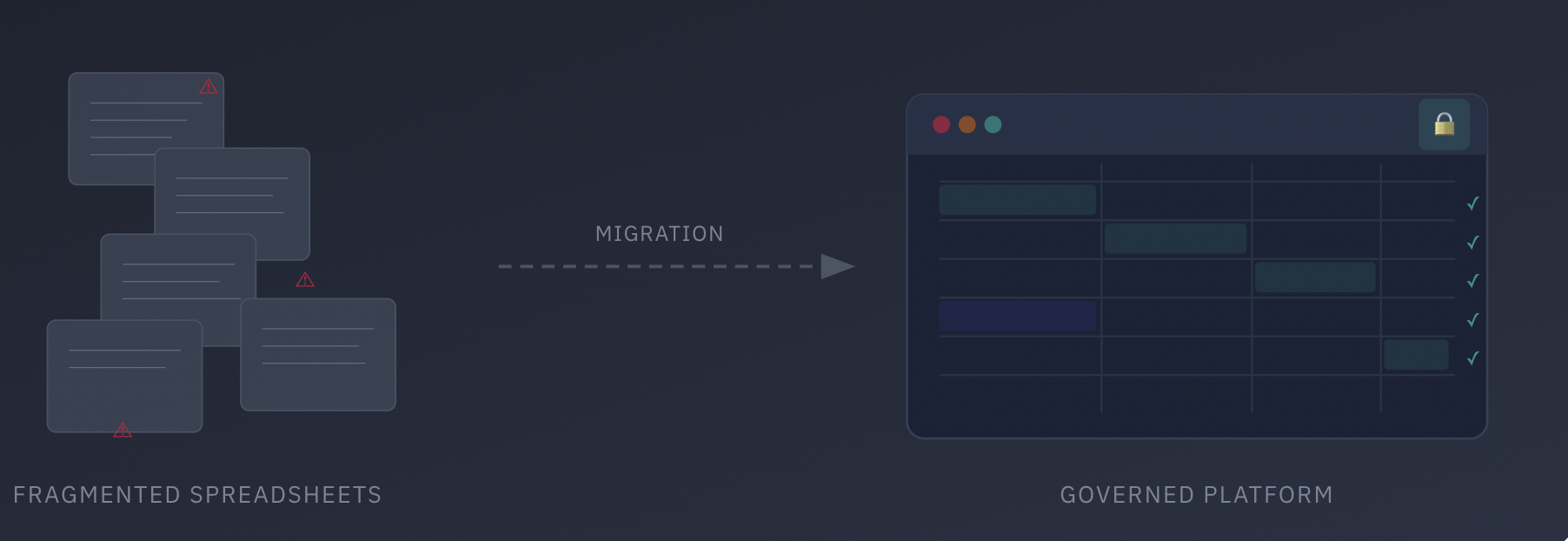
From fragmented spreadsheets to a governed platform: visualizing the migration journey
Assessment of Current Needs
Without a structured readiness assessment for Excel to custom software projects, organizations that seek to replace Excel with custom software risk replacing one operational bottleneck with another. The objective is to determine whether existing Excel workflows have reached structural limits and whether the organization possesses the technical and cultural capacity to transition successfully.
Current Capability Inventory
The first stage of the readiness assessment is building a current capability inventory. This inventory must document all Excel workflows that support daily operations, financial reporting, forecasting, compliance tracking, pricing models, and cross-department coordination. A true current capability inventory goes beyond file names; it captures ownership, data inputs, transformation logic, dependencies, output usage, and embedded business rule testing logic that may exist in formulas or macros.
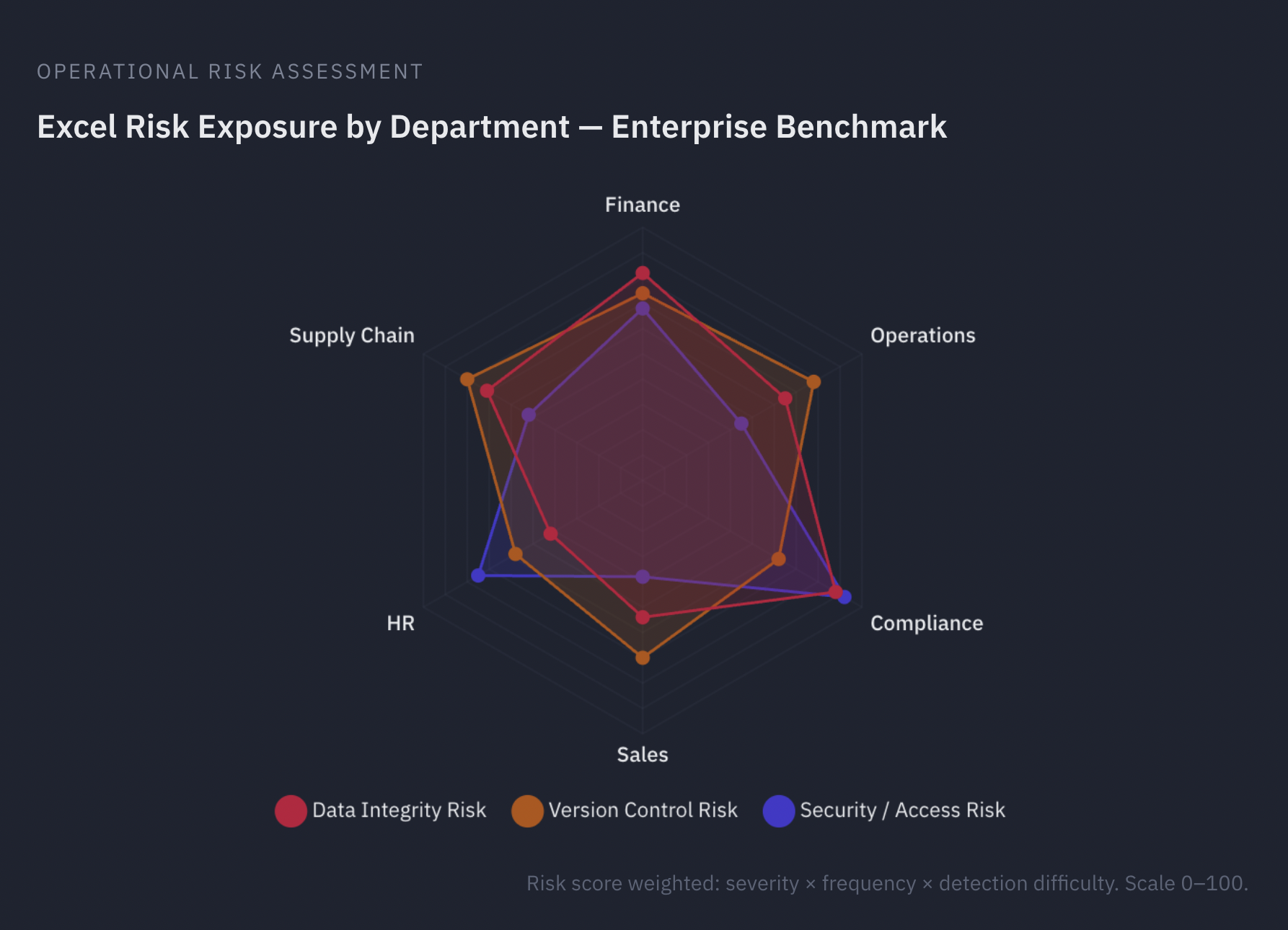
Excel risk exposure by department — enterprise benchmark: data integrity, version control, and security/access risk scores weighted by severity, frequency, and detection difficulty (scale 0–100)
Identifying Operational Pain Points
During this stage, it is essential to identify operational pain points. These pain points often emerge where Excel workflows attempt to support real-time updates, multi-user access, or cross-functional approvals. The readiness assessment must explicitly document these pain points rather than relying on anecdotal frustration.
Time Tracking Analysis
A time-tracking analysis further quantifies the operational cost of spreadsheet dependence. Measuring the hours teams spend on manual data entry, reconciliation, duplicate data entry across systems, and corrective adjustments exposes the financial impact of inefficient Excel workflows. In many organizations, accumulated labor costs exceed the projected investment required for a controlled system with automated business-rule testing and real-time updates.
Evaluating Technical Constraints
The readiness assessment must also account for technical limitations. Excel is operating at its architectural capacity when files approach functional row limits, calculation chains become unstable, or processing times significantly increase. Spreadsheets exceed their intended design when workflows necessitate real-time updates across distributed teams, structured permission hierarchies, or automated audit logs.
Skills Gap Analysis and Technical Expertise Requirements
Organizational readiness requires a structured skills gap analysis. This skills gap analysis should determine whether the organization has the technical expertise requirements necessary to design, implement, and maintain a custom platform. If internal capacity is insufficient, the organization must define whether to address gaps through hiring, upskilling, or external partners.
Network Capacity Assessment
A network capacity assessment is equally critical. The network capacity assessment must validate bandwidth stability, infrastructure resilience, identity management compatibility, and compliance controls before implementation begins. Beyond infrastructure and skills, the readiness assessment must acknowledge mastery anxiety.
Integrating the Assessment
A thorough Excel to custom software readiness assessment combines existing capability records, Excel workflow charts, error pattern identification, time-spent analysis, and clear identification of operational issues. It also validates whether the organization genuinely requires real-time updates and system-level enforcement of business rules.
Benefits and Rationale for Migration
Once the Excel to custom software assessment is complete, the next step is to build a compelling business case. This is not simply a list of features the new system will offer; it is a structured argument that connects operational limitations to strategic outcomes.
Limitations of Excel at Scale
Excel was designed as a personal productivity tool, not as an enterprise data management platform. As organizations grow, the gap between what Excel can do and what the business requires becomes increasingly consequential:
Performance degradation: While Excel theoretically supports over one million rows, real-world performance degrades dramatically with datasets exceeding 100,000 records. These performance limitations become increasingly severe as complexity grows — complex formulas like VLOOKUP and nested conditionals slow exponentially as data volume increases, and large files become sluggish, crash-prone, and unreliable. Excel’s 32-bit version limits memory usage to 2GB regardless of the machine’s capacity.
Data integrity risks: Manual data entry and formula-based logic are inherently error-prone. Research consistently shows that a significant percentage of complex spreadsheets contain material errors — from overwritten formulas to broken cell references — that go undetected until they cause downstream damage.
Collaboration bottlenecks: Even with Microsoft 365’s co-authoring capabilities, Excel files frequently spawn multiple versions with inconsistent changes and no clear audit trail. Version control issues compound as teams grow — simultaneous editing conflicts result in lost work or manual reconciliation, and email distribution of files makes it impossible to ensure everyone is working with the most current data.
Manual reporting processes: Organizations that rely on Excel for recurring reports — weekly dashboards, monthly financial summaries, quarterly compliance filings — find that manual reporting processes consume disproportionate staff time. Each report cycle requires refreshing data, rebuilding pivot tables, reformatting outputs, and distributing files — a labor-intensive routine that automation eliminates entirely.
Feature gaps in online versions: Excel Online lacks critical functionalities available in the desktop application — including full data validation, macro support, and add-in compatibility — forcing uncomfortable compromises between accessibility and capability for distributed teams.
Security and compliance concerns: Excel’s all-or-nothing approach to file access means users either have complete access or none at all, with limited ability to restrict visibility to specific sections. For industries with strict data security and regulatory requirements, this creates significant compliance concerns — there is no reliable way to enforce access policies, demonstrate audit compliance, or prevent unauthorized data exposure. Files stored on individual computers or shared drives lack the centralized security controls that regulated industries demand.
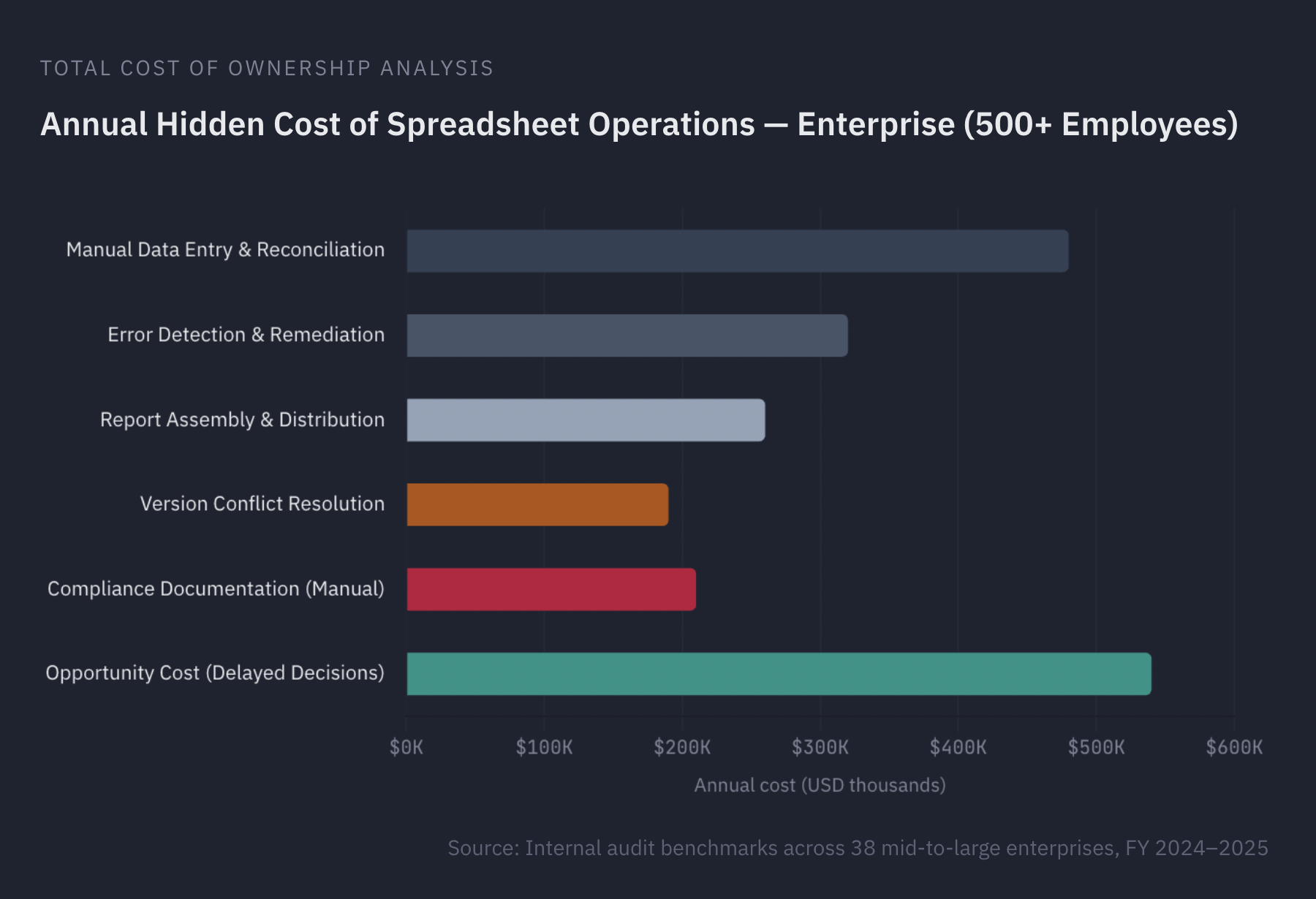
Annual hidden cost of spreadsheet operations for enterprises with 500+ employees — source: internal audit benchmarks across 38 mid-to-large enterprises, FY 2024–2025
Strategic Value and ROI of Custom Solutions
The rationale to replace Excel with custom software extends beyond eliminating spreadsheet risks. Purpose-built software enables the organization to automate repetitive processes and reduce manual workload, enforce data governance and compliance requirements at the system level, support real-time visibility and analytics for faster, more informed decision-making, and create a scalable platform that grows with the business rather than constraining it.
Operational efficiency and data accessibility. Custom platforms fundamentally improve operational efficiency by replacing fragmented, file-based processes with centralized, always-available systems. Data accessibility — the ability for any authorized user to retrieve the information they need, from any location, at any time — is a core advantage that spreadsheets cannot match. Combined with user-friendly interfaces designed for the specific workflows of each team, these systems reduce training time and improve adoption rates.
Quantifiable returns. The business case should be grounded in measurable outcomes wherever possible. Organizations that transition from spreadsheets to custom platforms typically report significant reductions in manual errors through automation — often in the range of 40–60% — alongside substantial time savings in reporting, reconciliation, and data preparation. Infrastructure efficiency improves as cloud-based applications eliminate the need for on-premises servers and reduce IT maintenance overhead.
Scalability and global accessibility. Unlike Excel’s fixed performance ceiling, cloud-based Excel to web app solutions automatically scale computing resources during peak usage, handle data volumes that dwarf Excel’s practical limits, and support international expansion with consistent experiences across regions, languages, and time zones. Users can be added with customized access levels without the bottlenecks of shared Excel environments.
Advanced analytics and intelligence. Custom platforms enable integration with machine learning and AI capabilities for pattern recognition and predictive analysis far beyond Excel’s statistical functions. Proactive alerting — automated notifications when business conditions change — replaces the manual process of scanning spreadsheets for anomalies.
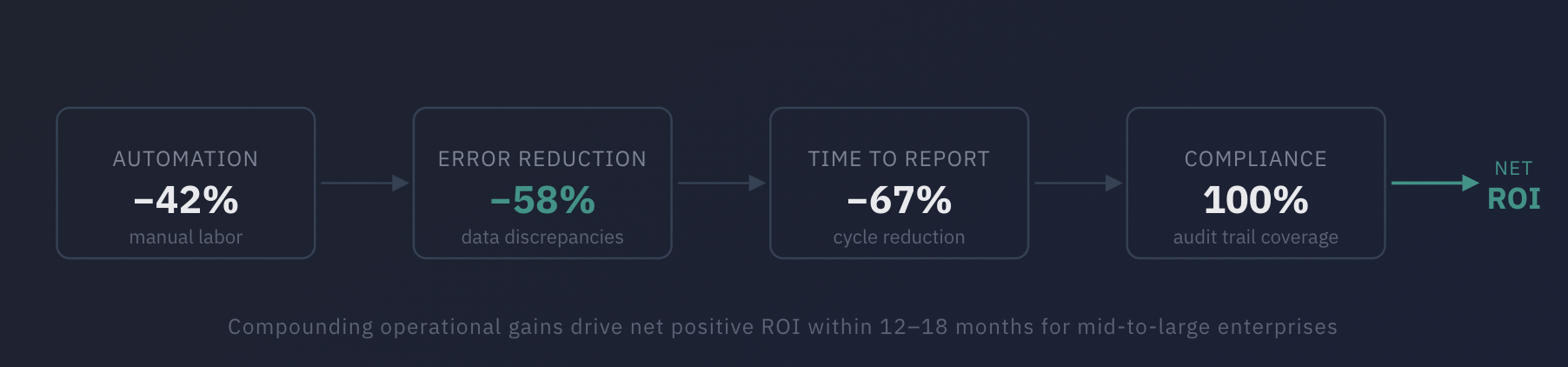
Compounding operational gains drive net positive ROI within 12–18 months for mid-to-large enterprises
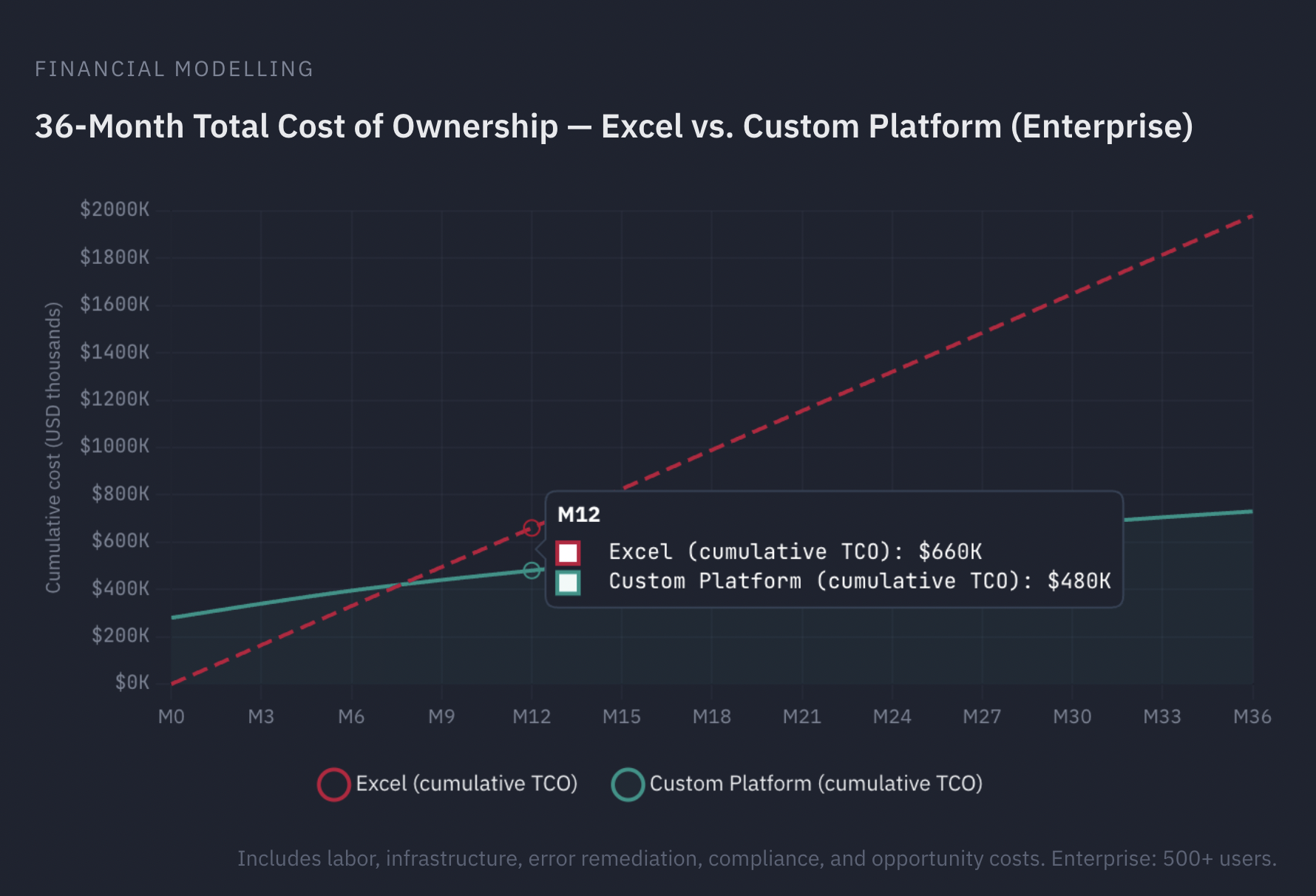
36-month total cost of ownership comparison — Excel vs. custom platform for enterprise (500+ users), including labor, infrastructure, error remediation, compliance, and opportunity costs
The business case to replace Excel with custom software should present these benefits alongside a realistic assessment of migration costs, timeline, and organizational effort required.
When Migration May Not Be Necessary
Not every spreadsheet-dependent process requires migration. A custom web application or Excel to web app solution may not be the right investment if the process is very lightweight or temporary, only one person manages the spreadsheet and it meets current needs adequately, or the organization is not prepared to invest in development and change management. The assessment phase should identify which processes genuinely warrant migration and which are better left as they are. Transitioning from Excel to custom software is a strategic decision, not a blanket recommendation.
Taken together, a strong business case addresses Excel’s performance limitations and collaboration bottlenecks head-on, quantifies the operational efficiency gains and manual reporting processes eliminated by automation, and demonstrates how data accessibility, data security, user-friendly interfaces, and seamless integration with other systems resolve longstanding compliance concerns and version control issues that spreadsheets cannot overcome at scale.
Migration Planning and Data Preparation
Once the decision to pursue Excel to custom software migration has been formally approved, execution discipline becomes the dominant success factor. Migration planning and data preparation determine whether the transition will be controlled and predictable or chaotic and reactive. The central mandate is clear: clean and structure your Excel data before any transfer occurs. Organizations that underestimate this phase routinely experience delays, data corruption, validation failures, and unplanned rework. Migration failure is rarely caused by technology limitations; it is most often caused by inadequate preparation.
A structured migration plan integrates data integrity controls, schema planning, data normalization, validation rules implementation, and phased approaches into a coordinated program. Each activity reinforces the others. Skipping one weakens the entire transition.
Data Audit, Classification, and Data Type Verification
Migration begins with a full data audit. Every spreadsheet, tab, column, formula, cross-reference, and dependency must be inventoried and classified. The objective is to determine what data is authoritative, what is duplicated, what is obsolete, and what must be transformed. This process often reveals redundant fields, conflicting business definitions, and hidden dependencies that were never formally documented.
Data type verification is a critical early control. Excel’s flexibility allows mixed data types within the same column, inconsistent date formats, embedded text in numeric fields, and irregular currency representations. While these inconsistencies may not immediately break spreadsheet workflows, they will cause import failures or silent corruption when moved into a structured database. Data type verification ensures that each column contains a single, validated data type aligned with the target schema.
At this stage, the organization must also eliminate redundancies by identifying duplicate records, overlapping datasets, and conflicting identifiers. Removing redundancy prior to database creation reduces structural complexity and strengthens long-term data integrity. Structuring the migration into sprint-based delivery cycles allows teams to validate data quality incrementally rather than discovering issues at the end of a monolithic migration.

Data migration pipeline: Extract, Transform, Schema, Load & Verify — a structured approach to moving spreadsheet data into a governed system
Schema Planning, Database Creation, and Structural Alignment
Schema planning translates flat Excel structures into a normalized relational architecture. Spreadsheets often maintain separate tabs for customers, transactions, products, or projects, connected through formulas or manual lookups. In a structured system, these informal links must be replaced by explicitly defined relationships.
Schema planning involves mapping Excel columns to database fields with precision. Each column must be evaluated for its destination table, data type, constraints, and relational dependencies. Establishing relationships between tables through primary and foreign keys formalizes what spreadsheets previously handled implicitly. This structural clarity ensures referential data integrity at the database level rather than relying on user discipline.
Database creation should not occur before schema validation is complete. During database creation, validation rules implementation becomes essential. Constraints such as required fields, acceptable value ranges, unique identifiers, and relational dependencies must be enforced directly in the schema. Validation rules implementation ensures that invalid data is rejected at entry rather than corrected retroactively. This shift from reactive correction to proactive prevention is one of the most significant advantages of migrating from spreadsheets to structured systems.
Data Normalization, Cleaning, and Data Integrity Controls
Raw Excel data rarely meets structured system standards. Data normalization standardizes naming conventions, date formats, currency representations, identifiers, and categorical values. It also ensures consistent capitalization, controlled vocabularies, and standardized reference values across datasets.
To maintain data integrity, cleaning activities must include resolving duplicate entities, reconciling conflicting entries, validating records against known business rules, and identifying missing or incomplete information. Data normalization reduces structural anomalies and prepares the dataset for relational enforcement within the database.
Data security considerations must also be embedded during preparation. Sensitive fields should be classified and mapped to appropriate access controls in the new system. Encryption requirements, masking rules, and user-level access policies should be defined before migration. The migration process itself must preserve data security to prevent exposure during transfer.
The principle is simple: migrating corrupted or inconsistent data into a clean system merely relocates the problem. Clean and structure your Excel data before transfer so that data integrity improves as a result of migration rather than deteriorates.
Mapping Logic, Business Rules, and Workflow Dependencies
Data alone is not sufficient. Spreadsheets often embed operational logic within formulas, macros, or manual approval processes. Migration planning must capture these rules and translate them into system-level validation rules implementation.
Mapping Excel columns to database fields is only one dimension of alignment. The organization must also map calculation logic, escalation triggers, reporting conditions, and workflow dependencies. Where Excel formulas previously calculated totals or flagged exceptions, embedded application logic or database procedures must now assume responsibility.
Establishing relationships between tables formalizes these dependencies. For example, order records must link reliably to customer records, product records, and payment records through enforced relational constraints. This structural clarity eliminates the risk of orphaned records or broken lookup references.
Phased Approaches, Risk Mitigation, and Budget Control
Large-scale migrations rarely succeed through single-event cutovers. Phased approaches reduce operational risk by segmenting migration into controlled stages. Each phase should include schema validation, data type verification, integrity testing, and stakeholder review before progression.
Phased approaches allow organizations to validate mapping accuracy, confirm database creation stability, and test validation rules implementation incrementally. This reduces the likelihood of systemic failure during high-pressure deployment windows.
The migration roadmap must define timelines, dependencies, resource allocation, and budget oversight. Budget planning should include development, database creation, data normalization, testing cycles, security validation, training, and contingency reserves. Underestimating preparation costs frequently results in emergency remediation spending later in the project lifecycle.
Migration planning and data preparation are not administrative steps; they are structural safeguards. Organizations that clean and structure their Excel data thoroughly, conduct rigorous data type verification, eliminate redundancies, complete disciplined schema planning, and execute careful mapping Excel columns to database fields create a foundation for sustainable data integrity. When validation rules implementation, establishing relationships between tables, data normalization, and phased approaches are treated as engineering requirements rather than optional activities, the resulting system performs reliably from day one.
Key Features of Custom Software Solutions
The new Excel to custom software system must be designed to solve the root problems that made Excel unsustainable, not simply replicate existing spreadsheet functionality in a different format. Understanding what a software development company does across the full delivery lifecycle helps organizations set realistic expectations for the migration process. The following capabilities — from a central database and real-time dashboards to robust workflow capabilities, database integration, and secure user authentication — should be considered foundational for any initiative to replace Excel with custom software and eliminate spreadsheet-dependent operations.
Central Database and Data Architecture
At the heart of every custom solution is a central database — a single, authoritative source of truth that replaces the fragmented, file-based storage model of spreadsheets. Unlike Excel, where data lives in disconnected files across desktops and shared drives, a central database enforces structural consistency, eliminates duplication, and enables concurrent access without version control conflicts. Robust data validation rules should be embedded at the database level, ensuring that every record meets defined quality standards before it enters the system.
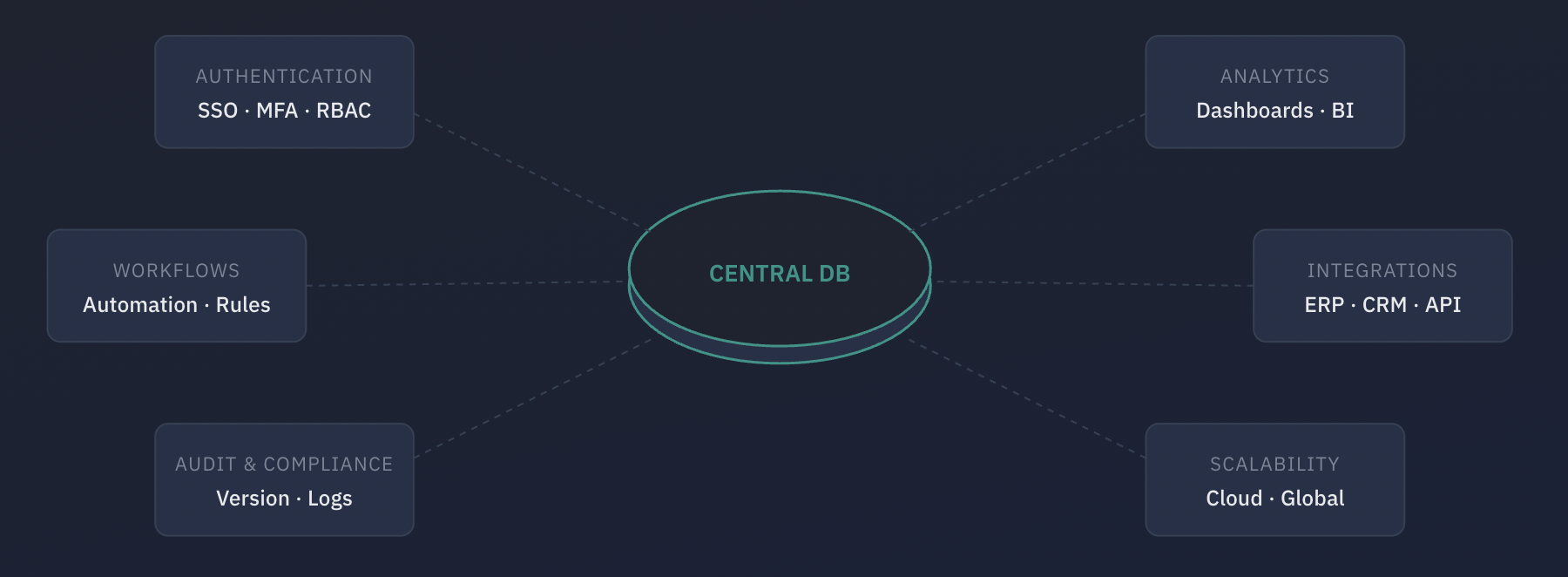
Central database architecture: a single source of truth connecting authentication, analytics, workflows, integrations, audit and compliance, and scalability
Automation and Custom Workflows
Replace manual, repetitive tasks — data entry, report generation, notification triggers — with automation built directly into the platform. Custom workflows should mirror and improve upon the business processes previously managed through spreadsheets: approval chains, escalation paths, conditional routing, and scheduled operations. The goal is not to automate for its own sake, but to eliminate the manual handoffs and copy-paste routines that introduce errors and consume staff time.
Role-Based Access and User Authentication
Implement granular, role-based access controls that restrict data visibility and modification rights based on each user’s organizational role. Pair this with secure user authentication — multi-factor authentication, single sign-on integration, session management — to address the security and governance gaps inherent in spreadsheet-based environments where any user with file access can view, copy, or modify any data.
Reporting and Analytics
Deliver real-time dashboards, customizable reports, and integrated reporting and analytics capabilities. The system should support both operational reporting and strategic analysis, with the ability to drill down from summary views to underlying data. Unlike static Excel charts, real-time dashboards should update automatically as underlying data changes, giving decision-makers an always-current view of key metrics without manual refresh cycles.
Integration with Other Systems
Design the system for seamless integration with other systems across the enterprise — ERP, CRM, accounting, HR, and external data sources — through APIs and standardized data exchange protocols. Database integration should be architected to support bidirectional data flows, ensuring that information entered in one system is reflected across all connected platforms without manual intervention. Isolated systems create the same data silos that spreadsheets did; the value of custom software is maximized when it serves as a connected node in the organization’s information architecture.
Version Control and Audit Trails
Implement system-level version control that automatically tracks every change — who modified what, when, and why. This replaces the error-prone practice of managing spreadsheet versions through file naming conventions and provides the audit trail required for compliance, dispute resolution, and process improvement.
Security, Compliance, and Scalability
Embed security and compliance requirements at the architecture level: encryption at rest and in transit, comprehensive audit logging, data retention policies, and regulatory alignment. The system architecture should be designed to scale horizontally as data volumes and user counts grow, without degradation in performance or reliability.
Transition-Friendly Design
Successful Excel to custom software migration depends not only on what the new system can do, but on how easily users can adopt it. Several design features directly support this transition:
Familiar data views. Where appropriate, incorporate spreadsheet-like grid interfaces that allow users to view, sort, and filter data in layouts that feel natural to experienced Excel users. This reduces the cognitive gap between old and new systems and accelerates adoption during the critical early weeks of deployment.
Formula and calculation replacement. Excel users rely heavily on formulas and custom calculations. The new platform should provide equivalent capabilities through business rules engines, expression builders, or configurable computed fields — ensuring that users do not lose analytical functionality in the transition. The difference is that these calculations are now governed, version-controlled, and validated at the system level rather than embedded in individual cells.
Import/export functionality. During the transition period — and potentially on an ongoing basis — users will need to move data between the new system and Excel. Robust import and export capabilities ease the Excel to custom software migration by allowing teams to continue using Excel for specific offline tasks or ad hoc analysis while the new platform handles structured, governed workflows. Over time, dependence on export functionality typically decreases as users discover the platform’s native reporting and analytics capabilities.
When these features work together — automation driving custom workflows, role-based access enforced through user authentication, real-time dashboards fed by a central database, and seamless database integration connecting the platform with other systems — the result is an Excel to custom software solution that fundamentally elevates the organization’s workflow capabilities and data validation standards.
Migration Methods and Tools
The choice of Excel to custom software migration strategy depends on the complexity of the data landscape, the organization’s risk tolerance, and the availability of resources. There is no single correct approach; the right strategy is the one that balances thoroughness with operational continuity. Equally important is the selection of the right migration tools and development platforms — from ETL software and Excel import tools to no-code platforms and traditional development frameworks.
Migration Strategies
Phased Migration. Migrate one module, department, or dataset at a time. Each phase is completed and validated before the next begins. Best for complex environments with interdependent systems.
Parallel Run. Run the old and new systems simultaneously for a defined period. Compare outputs to validate accuracy. Best for high-risk processes where data integrity is critical.
Full Replacement. Migrate everything at once on a defined cutover date. Requires thorough preparation and testing. Best for smaller datasets or systems with limited interdependencies.
Hybrid Approach. Combine phased and parallel strategies based on module complexity. Best for organizations with mixed-complexity workflows.
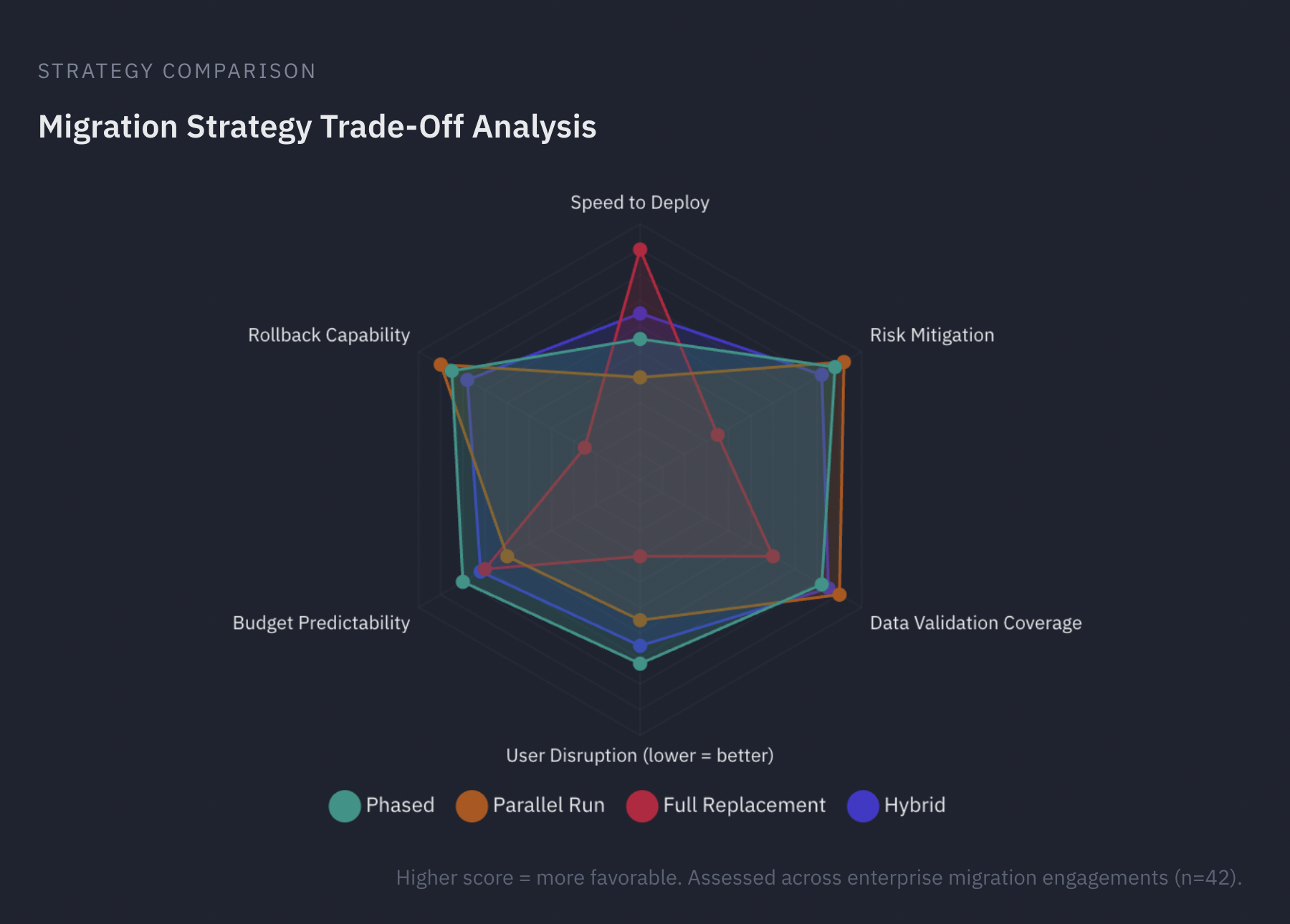
Migration strategy trade-off analysis: comparing phased, parallel run, full replacement, and hybrid approaches — assessed across enterprise migration engagements (n=42)
ETL Software and Data Movement Platforms
At the core of most migration efforts is ETL software — tools designed to extract data from spreadsheets and legacy sources, transform it into the required structure, and load it into the target system. Enterprise-grade ETL platforms such as Informatica and Talend offer robust connectors, scheduling capabilities, and data quality modules suited to large-scale, compliance-sensitive migrations. For organizations operating within the Microsoft ecosystem, Microsoft SSIS (SQL Server Integration Services) provides a tightly integrated option for moving data into SQL Server environments with built-in transformation and validation capabilities.
For smaller-scale or more technically agile teams, Python scripts using libraries such as Pandas offer a flexible, cost-effective alternative. Pandas excels at reading, cleaning, and reshaping spreadsheet data programmatically, and is particularly well suited for ad hoc transformations, data validation, and rapid prototyping of migration logic. Dedicated Excel import tools — whether standalone utilities or features embedded in database platforms — can further streamline the ingestion of structured spreadsheet data into relational databases.
Development Approach: Build vs. Configure
The choice of how to build the target system is as consequential as the migration strategy itself. Organizations typically evaluate three categories of development platforms:
No-code platforms allow business users to create applications using drag-and-drop editors and visual configuration — no programming required. These Excel to web app platforms are well suited for straightforward workflow automation, form-based data entry, and simple reporting needs. They enable rapid deployment and reduce dependence on engineering resources, but may impose constraints on customization and scalability.
Low-code platforms occupy the middle ground, offering visual development environments with the option to extend functionality through custom scripting. They accelerate delivery while preserving flexibility for more complex business logic, integrations, and user interface requirements. For many mid-market organizations, low-code platforms represent the optimal balance between speed and capability.
Traditional development frameworks — including full-stack web frameworks, enterprise application platforms, and custom-built architectures — provide maximum control and flexibility. This approach is appropriate for organizations with complex, highly differentiated requirements, large data volumes, or stringent security and compliance obligations. Traditional development carries higher upfront cost and longer timelines, but delivers systems that are fully tailored to the organization’s needs and can evolve without platform constraints. For a detailed breakdown of cost drivers across these approaches, see our guide on custom software development pricing.
Integration and Validation Tools
Regardless of development approach, the migration toolkit should include API-based integration layers to connect the new system with existing infrastructure (ERP, CRM, accounting), and data validation frameworks that automate comparison between source and target data. The selection of tools should be driven by the specific technical requirements identified during the planning phase, the organization’s internal capabilities, and the long-term maintainability of the chosen stack.
In practice, many Excel to web app migrations combine tools and approaches: Informatica or Talend for enterprise-grade ETL, Microsoft SSIS for SQL Server environments, Python scripts with Pandas for custom transformations, and database direct imports for straightforward data loading. On the development side, the choice between no-code platforms with drag-and-drop editors, low-code platforms for more complex requirements, and traditional development frameworks for maximum flexibility should be guided by the complexity of business logic, integration needs, scalability expectations, and available technical expertise.
Implementation Process
The implementation process is the controlled execution phase where spreadsheet-dependent workflows are converted into a structured Excel to web application architecture. At this stage, the organization transitions from analysis to system realization. Precision, governance, and architectural discipline determine whether implementation stabilizes operations or introduces new systemic risk.
A successful implementation process integrates a formal process mapping exercise, validated spreadsheet conversion technologies where applicable, structured development cycles, rigorous data synchronization design, controlled integration touchpoints, and embedded role-based training paths. Execution must be systematic rather than reactive.
Process Mapping Exercise and Architectural Translation
Implementation begins with a detailed process mapping exercise. Each spreadsheet workflow must be decomposed into discrete operational steps, decision logic, approval flows, and dependency chains. This ensures that implicit Excel logic becomes explicit system behavior.
During this stage, spreadsheet tabs are translated into relational entities, and computed columns previously handled through Excel formulas are reimplemented within the application layer or database engine. Computed columns must be formally defined, validated, and tested to ensure mathematical equivalence with legacy logic.
The process mapping exercise also identifies all integration touchpoints. These include ERP systems, CRM platforms, billing engines, authentication services, reporting tools, and external APIs. Each integration touchpoint must specify synchronization direction, frequency, data ownership, and failure-handling protocols.
User interface customization decisions are made at this architectural level. The Excel to web application interface should reflect operational workflows rather than replicate spreadsheet layouts mechanically. Structured UI design reduces friction while preserving productivity.
Platform Execution: Conversion Technologies or Custom Development
The implementation path depends on platform selection. Organizations leveraging spreadsheet conversion technologies such as EASA, SpreadsheetWeb, or the Open As App platform can accelerate transformation by converting validated spreadsheet logic directly into governed Excel to web application interfaces.
EASA is particularly effective for engineering-grade spreadsheet models requiring controlled deployment. SpreadsheetWeb enables rapid deployment of form-driven Excel to web app solutions while preserving business rules. The Open As App platform supports rapid mobile and browser-based deployment, particularly in a no-code environment.
In a no-code environment, configuration replaces traditional coding. However, governance remains mandatory. Data synchronization logic, computed columns behavior, and integration touchpoints must still be explicitly defined and tested. Even when spreadsheet conversion technologies are used, architectural oversight prevents uncontrolled replication of spreadsheet complexity inside a new interface.
For custom-built implementations, iterative development cycles should prioritize core data synchronization architecture early. Synchronization mechanisms must define whether updates are real-time, near-real-time, or batch-based. Conflict resolution policies must be documented. Integration touchpoints should be stress-tested under realistic load conditions before production release.
Data Synchronization and Integration Governance
Data synchronization is the backbone of implementation stability. Every integration touchpoint must specify data ownership, synchronization timing, validation rules, and error-handling protocols. Without disciplined synchronization design, even a well-built Excel to web application system will degrade into inconsistency.
Testing must validate synchronization accuracy across edge cases, partial failures, and recovery scenarios. Computed columns dependent on synchronized data require special attention, as timing discrepancies can produce misleading outputs.
Integration touchpoints should be monitored through logging and alerting mechanisms from the first release. Implementation is incomplete without observability.
Testing Strategy and Validation Controls
Testing must move beyond superficial validation. Each computed column must be tested against legacy spreadsheet outputs to confirm logical consistency. Spreadsheet conversion technologies should undergo regression testing to ensure formula translation accuracy.
Integration testing must validate that every integration touchpoint exchanges data correctly under both normal and stress conditions. Performance testing must confirm that the Excel to web application scales under concurrent user activity.
Security testing must verify that role-based training paths align with permission models. Role-based training paths should not only guide users through features but reflect structured access hierarchies embedded in the system.
No deployment should proceed without formal sign-off confirming successful testing across functional, integration, performance, and security domains.
Pilot Deployment, Training, and Controlled Rollout
A pilot phase reduces enterprise-wide risk. During pilot deployment, real users interact with the Excel to web application within a controlled environment. This validates user interface customization, confirms data synchronization stability, and ensures integration touchpoints function as intended.
Role-based training paths should activate during pilot deployment. Users receive guidance tailored to their operational role, accelerating adoption and reducing support load.
Following successful validation, rollout proceeds in structured waves. Monitoring must track system performance, synchronization integrity, and usage behavior. Post-launch governance ensures that configuration changes in a no-code environment remain controlled and auditable.
The implementation process is not merely development. It is the architectural replacement of spreadsheet logic with a governed Excel to web app system behavior. Whether executed through EASA, SpreadsheetWeb, the Open As App platform, or custom development within a no-code environment, success depends on disciplined process mapping exercise execution, validated spreadsheet conversion technologies, precise computed columns implementation, stable data synchronization architecture, clearly defined integration touchpoints, thoughtful user interface customization, and structured role-based training paths.
Change Management and User Adoption
Technology alone does not deliver transformation — people do. Even the most technically successful effort to replace Excel with custom software will fail if the organization does not adopt and effectively use the new system. Effective change management strategies are not an afterthought; they form a core workstream that runs in parallel with every technical activity. Overcoming resistance to change — whether rooted in habit, fear of the unknown, or legitimate concerns about disruption — is the single greatest determinant of adoption success.
Understanding the Psychology of Excel Attachment
Before designing a change strategy, it is essential to understand why spreadsheet users resist an Excel to web app migration — even when they acknowledge Excel’s limitations. This resistance is rarely irrational; it reflects real concerns that must be addressed directly.
Skill investment recognition. Many users have invested years in developing advanced Excel expertise — complex formulas, macros, pivot table techniques — and this knowledge forms part of their professional identity. Migration can feel like a devaluation of that investment. Acknowledging this explicitly, and framing the transition as an expansion of skills rather than a replacement, is critical.
Control concerns. Spreadsheets give users direct, visible control over data and calculations. Moving to a structured system can feel like a loss of autonomy — the ability to manipulate, experiment, and explore data on their own terms. System design should preserve analytical flexibility where possible.
Workflow disruption. Even users who agree with the rationale for migration will worry about short-term productivity loss. Validating this concern openly — and providing concrete plans to minimize disruption — builds trust.
Building a Compelling Change Narrative
Resistance is overcome not through mandate but through meaning. The organization must build a positive, benefits-focused narrative that resonates at every level.
Personal value emphasis. Clearly articulate how the new system will make individual users’ work lives better — not just how it benefits the organization. Reduced time spent on manual tasks, fewer late nights fixing broken spreadsheets, and the ability to find answers faster are tangible personal benefits.
Pain point resolution. Connect the new solution directly to the specific frustrations users currently experience. If the team has spent months complaining about version conflicts, the change narrative should lead with that problem and its resolution.
Success visualization. Help users imagine their future state with concrete examples of how their daily work will improve. Demonstrations, pilot success stories, and side-by-side comparisons of “before and after” workflows are more persuasive than abstract promises.
The WIIFM principle. “What’s In It For Me” messaging should be customized for different user roles based on their specific responsibilities and pain points. What motivates a finance analyst is different from what motivates a warehouse manager. A sales team will respond to the promise of CRM (customer relationship management) integration that eliminates double-entry between their spreadsheets and the company’s contact database. A field operations team will respond to mobile access that lets them update records from job sites instead of waiting until they return to the office.
For teams in regulated industries, compliance capabilities — audit trails, access controls, data retention — should be presented not as restrictions but as protections that reduce personal risk and eliminate the manual documentation burden that currently falls on individual users.
Training and Support Structures That Drive Adoption
Design training programs that are role-specific, practical, and accessible. Training should begin well before go-live and continue after deployment.
Multi-modal learning. Provide training in multiple formats — live sessions, recorded walkthroughs, written documentation, quick-reference cards — to accommodate different learning preferences and schedules. Not everyone learns best in a classroom setting.
Role-based training paths. Create specialized training tracks tailored to how different user roles will interact with the system. A data entry operator needs different training than a department head reviewing dashboards or an administrator managing user permissions.
Sandbox environments. Give users safe, consequence-free spaces to practice and experiment with the new system before go-live. The ability to click, explore, and make mistakes without fear of breaking production data dramatically accelerates comfort and competence.
Peer champions program. Identify enthusiastic early adopters — particularly respected Excel power users — and empower them as peer-to-peer support resources. In practice, colleagues often trust and learn more effectively from a peer champion on their own team than from IT-delivered training sessions. Invest in these champions with early access, advanced training, and visible recognition.
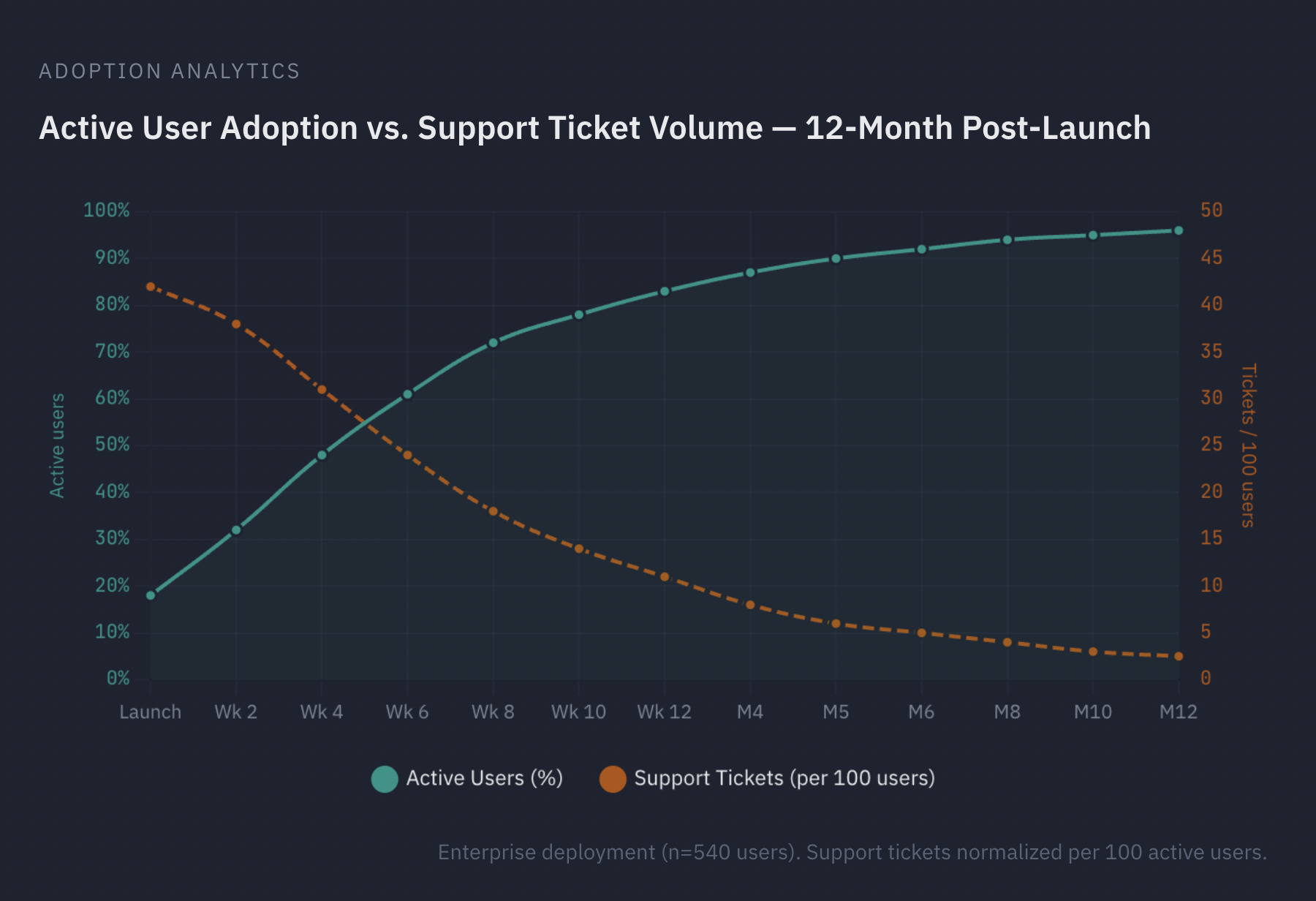
Active user adoption vs. support ticket volume — 12-month post-launch: enterprise deployment (n=540 users), support tickets normalized per 100 active users
Feedback and Continuous Improvement
Establish formal feedback mechanisms — surveys, office hours, issue trackers — and demonstrate that user input leads to real improvements. Track adoption metrics (login frequency, feature utilization, support ticket volume) and use them to identify areas where additional support or system refinement is needed. The first ninety days after go-live are the most critical window for adoption success; sustained attention during this period determines whether the new system becomes embedded in daily operations or gradually abandoned in favor of familiar spreadsheet habits.
Effective Excel to web app change management strategies ultimately rest on four pillars: overcoming resistance by understanding the psychology of Excel attachment and building a compelling change narrative that speaks to every user role, delivering multi-modal learning and role-based training paths through a peer champions program that sustains momentum beyond initial deployment, leveraging the new system’s compliance, mobile access, and global accessibility advantages to demonstrate value that Excel cannot match, and embedding continuous feedback loops that ensure the system evolves in response to real user needs rather than initial assumptions.
Industry-Specific Applications and Examples
While the decision to migrate from Excel to custom software follows universal principles, industry-specific applications vary significantly in complexity, regulatory pressure, data sensitivity, and reporting intensity. What remains consistent across sectors is the shift from fragmented spreadsheet logic to structured systems built on a central database, governed by user-level access controls, version control, audit logs, and integrated reporting and analytics. The following examples demonstrate how different industries replace Excel with custom software for scalable, auditable, and operationally resilient solutions. For organizations budgeting these projects, understanding software development cost per hour by region provides a practical framework for resource allocation.

Industry-specific migration applications: Finance, Healthcare, Logistics, Manufacturing, SaaS, and eCommerce
Finance and Accounting
Finance and accounting teams that need an Excel to web app solution often operate on spreadsheet ecosystems that manage reconciliation, budgeting, forecasting, tax calculations, regulatory reporting, and multi-entity consolidation. As transaction volumes increase and compliance requirements intensify, spreadsheet-based calculators and manual consolidation processes introduce structural risk.
Migration to a central database-backed platform transforms reporting from reactive assembly to controlled automation. Instead of emailing revised files and reconciling conflicting versions, finance teams operate within reporting apps that enforce version control at the system level. Every adjustment, approval, and override is captured in comprehensive audit logs, creating defensible documentation for internal controls and regulatory review.
In Excel to web application migrations, embedded web calculators replace fragile spreadsheet formulas for tax modeling, amortization schedules, pricing models, and financial projections. These calculators operate against validated data stored in a central database, eliminating discrepancies caused by inconsistent formula edits. Dashboards provide real-time visibility into revenue, cash flow, exposure, and compliance metrics. Integrated reporting and analytics remove the need for manual consolidation across departments, enabling finance leadership to access trusted numbers without waiting for spreadsheet assembly cycles.
Healthcare
Healthcare organizations frequently rely on spreadsheets to manage scheduling, billing coordination, inventory tracking, compliance documentation, and operational planning. However, spreadsheets cannot reliably enforce user-level access controls or maintain defensible audit logs for patient-related data.
Medical practice apps built on secure platforms replace informal Excel trackers with structured systems that restrict visibility based on clinical role. User-level access controls ensure that physicians, nurses, billing staff, and administrators access only the data relevant to their responsibilities. Audit logs automatically record every modification, review, and approval action, strengthening compliance posture.
Clinical checklists embedded directly into medical practice apps standardize procedural workflows and create verifiable documentation trails. Dashboards display patient flow metrics, billing performance, resource utilization, and compliance indicators in real time. In smaller clinics or specialized departments, a targeted no-code app can replace isolated spreadsheets while still operating against a secure central database. Whether implemented as a comprehensive medical practice app or as focused departmental tools, the migration eliminates the compliance gaps inherent in spreadsheet-based clinical data management.
Logistics and Supply Chain
Supply chain and logistics teams seeking an Excel to web app solution often maintain multiple spreadsheets to track inventory levels, shipment status, vendor coordination, and demand forecasting. As networks expand, the absence of centralized version control and consistent validation logic leads to operational fragmentation.
Custom platforms unify operations around a central database that synchronizes warehouse data, supplier inputs, and transportation updates. Dashboards provide real-time visibility into shipment status, bottlenecks, and exception alerts. Embedded web calculators support route optimization, freight cost estimation, and capacity planning, replacing standalone spreadsheet calculators shared via email.
User-level access controls regulate data visibility across partners and internal teams. Audit logs document changes to orders, inventory adjustments, and fulfillment updates. Reporting and analytics aggregate performance metrics across locations, enabling data-driven decisions without manual consolidation. The system helps replace Excel with custom software, using structured reporting apps and enforceable version control.
Manufacturing
Manufacturing organizations seeking an Excel to web app solution frequently depend on spreadsheets for production scheduling, quality tracking, material planning, and equipment maintenance. These spreadsheet calculators often contain complex formulas that evolve informally over time, creating inconsistency and traceability challenges.
Excel to web application migration introduces version control over production data and structured audit logs for quality events and operational changes. Embedded web calculators support yield analysis, material consumption optimization, production costing, and equipment performance modeling within a controlled environment. Dashboards display real-time production metrics, downtime indicators, and non-conformance trends.
Checklists embedded into quality control workflows standardize inspection procedures and create auditable completion records. Reporting apps consolidate plant-level performance into centralized reporting and analytics, eliminating cross-file reconciliation. The transition replaces fragmented spreadsheet logic with structured, system-level governance supported by user-level access controls and a unified central database.
SaaS and Technology Startups
Technology startups seeking an Excel to web app solution often begin with spreadsheets for subscription tracking, revenue modeling, customer health scoring, and internal reporting. As growth accelerates, manual updates and inconsistent version control slow decision-making and create financial risk.
Custom reporting apps integrate billing systems, CRM platforms, and product analytics into a central database. Dashboards provide real-time visibility into churn, lifetime value, revenue recognition, and pipeline health. Embedded calculators manage subscription pricing logic and forecasting models in a version-controlled environment.
Startups may initially deploy a no-code app to replace operational spreadsheets without diverting engineering resources. Over time, this Excel to web application approach evolves into fully integrated reporting and analytics systems. User-level access controls ensure role-based visibility for product, finance, and operations teams, while audit logs capture configuration changes and financial adjustments. The result is a scalable internal system that replaces spreadsheet dependency with controlled reporting apps and structured data governance.
eCommerce and Retail
Retail and eCommerce businesses frequently rely on spreadsheets for catalogue management, pricing updates, promotional calendars, and margin analysis. As product volumes increase, spreadsheet calculators and inconsistent file versions introduce pricing errors and fulfillment delays.
A centralized platform manages product data within a structured central database. Version control tracks pricing rule changes and promotional adjustments. Embedded web calculators support margin modeling, discount simulation, and inventory forecasting without exposing underlying formulas to manual edits.
Dashboards provide real-time insights into sales performance, stock levels, and promotional impact. Reporting and analytics consolidate channel performance across marketplaces and direct sales platforms. User-level access controls regulate who can modify pricing logic or promotional rules. Audit logs document every catalogue update and pricing change, ensuring traceability and accountability.
Across industries, the pattern remains consistent. Spreadsheets are replaced not simply by software, but by structured systems built on a central database, governed by version control, protected by user-level access controls, validated through embedded web calculators, and documented through comprehensive audit logs. Reporting apps and integrated reporting and analytics become platform-native capabilities. Industry-specific applications differ in regulatory context and operational detail, but the architectural foundation — and the benefits it delivers — are universal.
FAQ
When should an organization migrate from Excel to custom software?+
Migration becomes necessary when spreadsheets create operational risks that outweigh their convenience. Key indicators include frequent data errors from manual entry, version control conflicts across teams, difficulty enforcing access controls, compliance gaps from unauditable changes, and performance degradation as data volumes grow. If your organization spends more time managing spreadsheets than using the data they contain, it is time to evaluate a structured alternative.
How long does it typically take to migrate from Excel to a custom system?+
Timeline depends on data complexity, the number of workflows being replaced, and the chosen development approach. A focused migration replacing a single department’s spreadsheets with a no-code or low-code solution can take 4–8 weeks. Mid-complexity projects involving multiple departments and integrations typically require 3–6 months. Enterprise-scale migrations with legacy system integrations, compliance requirements, and phased rollouts can extend to 9–18 months.
What is the best migration strategy: phased, parallel, or full replacement?+
There is no universally best strategy — the right choice depends on your organization’s risk tolerance and complexity. Phased migration is safest for complex environments with interdependent systems. Parallel run is ideal for high-risk processes where data integrity must be validated before cutover. Full replacement works for smaller datasets with limited dependencies. Most organizations benefit from a hybrid approach that combines elements of phased and parallel strategies based on module complexity.
Can we continue using Excel during the migration process?+
Yes — and in most cases, you should. A parallel run strategy keeps both systems operating simultaneously until the new platform is validated. Even with phased migrations, robust import and export functionality allows teams to move data between the new system and Excel during the transition. This approach minimizes workflow disruption and gives users time to build confidence in the new system before spreadsheet access is retired.
How do you handle employee resistance to leaving Excel?+
Resistance is natural and should be addressed through structured change management rather than mandates. Start by acknowledging users’ Excel expertise as valuable rather than obsolete. Build a compelling change narrative focused on personal benefits — less manual work, fewer errors, faster answers. Provide role-based training, sandbox environments for practice, and identify peer champions among respected Excel power users. The first ninety days after go-live are critical for establishing new habits.
Should we choose a no-code platform or custom development?+
No-code platforms are well suited for straightforward workflow automation, form-based data entry, and simple reporting needs — they enable rapid deployment without engineering resources. Low-code platforms offer a middle ground with visual development plus custom scripting for more complex logic. Traditional custom development provides maximum control and flexibility for organizations with complex requirements, large data volumes, or stringent compliance obligations. The choice should be guided by business logic complexity, integration needs, scalability expectations, and available technical expertise. In all cases, success depends on hiring the right software developers with domain experience relevant to your industry and migration complexity.
What happens to our existing Excel formulas and calculations during migration?+
Excel formulas and computed columns are reimplemented within the application layer or database engine of the new system. Each formula must be formally defined, validated, and tested to ensure mathematical equivalence with legacy logic. The new platform replaces fragile cell-level formulas with governed business rules engines, expression builders, or configurable computed fields — delivering the same analytical functionality with version control, validation, and audit trails that spreadsheets cannot provide.
Conclusion
Migrating from Excel to custom software is a significant undertaking, but it is one that virtually every growing organization will face. The question is not whether to make the transition, but when and how to do it well.
The framework presented in this paper — assessment, business case, planning, design, migration, implementation, adoption, and industry application — provides a repeatable, risk-managed approach to this critical transformation. Success depends not on the choice of any single tool or platform, but on the rigor of preparation, the quality of execution, and the commitment to supporting the people who will use the new system every day.
Organizations that approach this transition with discipline and strategic intent will not only eliminate the risks and limitations of spreadsheet dependency — they will build a digital foundation capable of supporting the next phase of their growth.